


- Wi-fi Enabled
- Motion Detection Technology
- Night Vision
- Discreet Lens


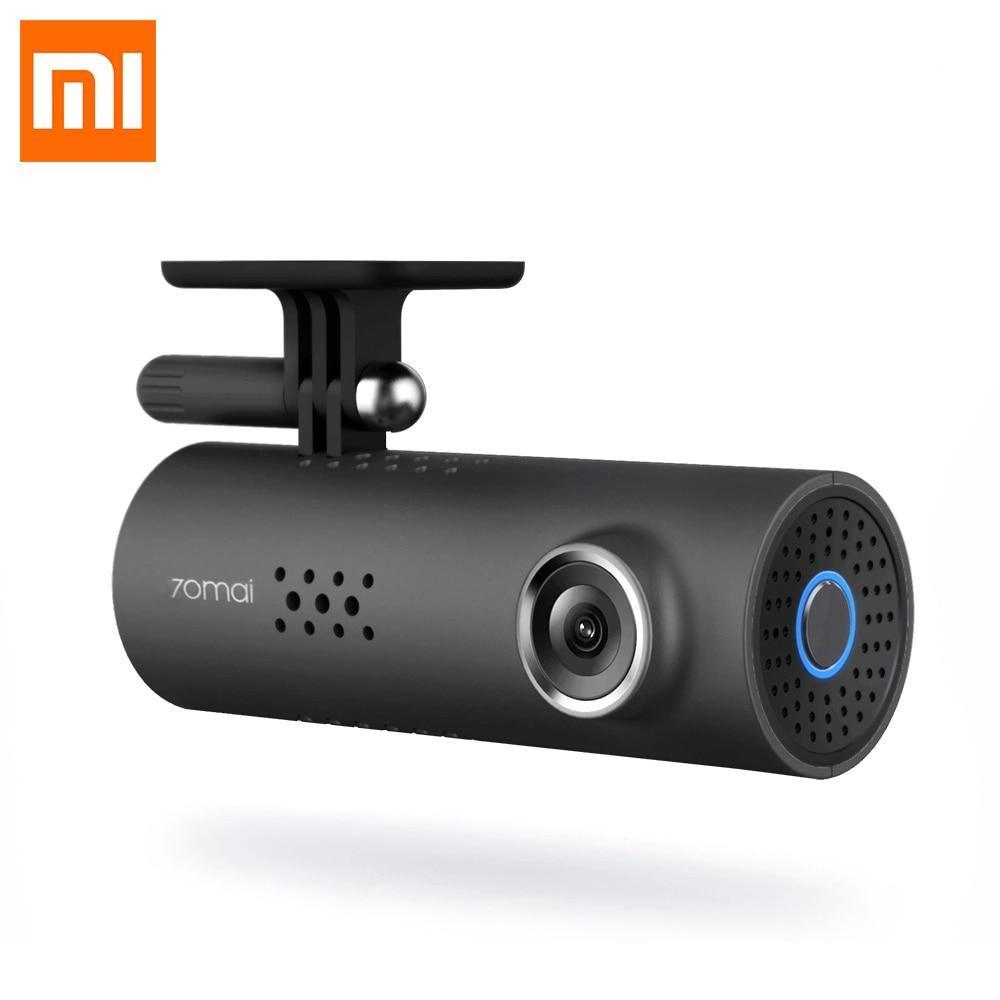
Embark on a journey with enhanced safety and clarity with the Xiaomi WIFI Dash Cam, a device that's not just a dash cam but a guardian of your road trips. Equipped with a Sony IMX323 image sensor, this dash cam revolutionizes your driving experience by offering outstanding recording quality, ensuring every detail of your journey is captured with precision.
Top-of-the-Line Imaging and Video Quality
- Sony IMX323 Image Sensor: Capture every moment in stunning detail with the superior imaging capabilities of the Sony sensor, renowned for its clarity and reliability.
- Full HD 1080P Lens: Enjoy crystal-clear footage with the 1080P full HD lens, ensuring that every frame is captured with high fidelity.
- Wide-Angle Recording: The 130-degree adjustable holder offers a broader perspective, encompassing more of the road and surroundings in your recordings.
Advanced Recording Technologies
- H.264 Photography Compression: This technology ensures high-quality recordings without consuming excessive storage space.
- Seamless Loop-Cycle Recording: Never miss a moment with the loop-cycle recording feature, which automatically overwrites the oldest files when the memory is full.
- G-sensor Technology: In the event of a collision, the G-sensor automatically locks the current video, preventing it from being overwritten and preserving crucial evidence.
Connectivity and Convenience
- Wi-Fi Connectivity: Stay connected and in control with the dash cam's Wi-Fi capabilities, allowing you to easily manage your recordings and settings.
- User-Friendly Interface: The dash cam features a Micro SD/TF, WI-FI, and USB2.0 interface, ensuring compatibility and ease of use.
- Voice and OSD Language Support: Navigate the dash cam effortlessly with voice commands and an English OSD language option.
Enhanced Safety Features
- Night Vision: Achieve optimal performance in low-light conditions, ensuring your safety and recording clarity even during nighttime driving.
- Motion Detection Technology: This feature adds an extra layer of security, recording any movement around your vehicle when parked.
Additional Specifications
- Memory Card Compatibility: Supports Class 10 memory cards, with a maximum external memory capacity of 64G.
- Frames Per Second: Records at 30 frames per second, providing smooth and continuous footage.
- Sleek and Discreet Design: The unobtrusive lens design maintains the sleek appearance of your vehicle's interior.
The Xiaomi WIFI Dash Cam is more than just a recording device; it's a commitment to safer, smarter driving. Whether you're navigating busy city streets or embarking on long road trips, this dash cam is your reliable companion, offering peace of mind with every mile. Drive confidently, knowing that every moment is captured in exceptional clarity with the Xiaomi WIFI Dash Cam.
.
Main Features:
● 130 degrees FOV, cover wide vision range
● 1920 x 1080P HD resolution, clear FHD recording
● 1/2.9 inch light-sensitive components, capture clear images during nights
● With Sony IMX323 image sensor, provide you better performance
● WiFi connection allows you to real-time to watch the recording and share the videos or images on the popular social media
● Advanced H.264 photography compression technology keeps high-quality videos and plays a part in saving storage as well
● High-temperature resistant adhesive, can avoid the problem of falling under high-temperature conditions, provide strong adhesive force, but also more beautiful and do not damage the car glass
● Coupled with car charger and micro USB power cable for power supply, convenient for users to adapt themselves according to their needs in the car
● The video can be monitored on the APP "70mai Dash Cam" of your phones, you can download APP from Google Play or Apple Store
● Rotatable holder meets various recording demands
● Simple and exquisite appearance: be a decoration in your car
Specifications
Model Name: Xiaomi WIFI Dash Cam
Item Type: Xiaomi WIFI Dash Cam Car DVR
Interface: Micro SD/TF,WI-FI,USB2.0
Memory Card Required Reding Speed: Class 10
Pixels: 200Mega
Special Features: Wifi Function,Voice,SD/MMC Card,Cycle Recording,Time&Date Display
Assembly Mode: Portable Recorder
Camera Resolution: 1920x1080
OSD Language: English
Original Package: Yes
Max External Memory: 64G
Imaging Sensor: Sony IMX323
Frames Per Second: 30
Video Format: MOV
Video Code: H.264


Featured products
Onsale Products


Newest Products